
Payment Options, Plans, & Billing
What You Need to Know
Managing your educational expenses is vital to your journey at the School of the Art Institute of Chicago, and we are here to help you navigate the process every step of the way. Review the information below to stay on track with important dates and deadlines, explore our payment plans, and finalize your payment arrangements to ensure your account is up to date.
Important Dates & Deadlines
To stay on track with your tuition payments, please note the following due dates:
| Semester | Payment Due Date |
|---|---|
Summer | May 15 |
Fall | August 15 |
Winter | December 15 |
Spring | January 15 |
Payment arrangements must be completed by the 15th before each semester to avoid late fees and restrictions on campus access, registration, and transcript releases.
Note: Payments received by December 20 each year will be credited to your account and included on that year's 1098-T form (if eligible). Payments after December 20 will be credited in January and included on the following year's 1098-T form. More information is available at saic.edu/1098t.
Billing Process
SAIC provides online bills at the end of each month to students who have a balance due and to those who have had account activity since the last monthly bill. Bills will not be generated for accounts that do not have a balance or have no activity since the last billing month.
Electronic bills (eBills) are available to students and payers in Illumia. Payers are set up by the student in Illumia. An email notification is sent each month to students and payers when a new bill is available in Illumia.
-
Semester
Estimated Date that Charges are Available Online (for Enrolled Students)
Estimated First Bill Date (approx. third week of each month)
Summer
Third Week of April
Third week of April
Fall
First Week of July
Second week of July
Winter
Third Week of November
Third week of November
Spring
Third Week of December
Third week of December
-
SAIC issues electronic bills at the end of each month for students with a balance or account activity.
Accessing eBills:
- Log into Self-Service.
- Click on Financial Account.
- Open Transact and click on "Statements."
How to Make Your Payment
At SAIC, we offer multiple payment methods to fit your needs:
-
Where to Send:
SAIC Bursar's Office
37 S. Wabash Ave., Suite 245
Chicago, IL 60603
312.899.5122 -
Visit the Bursar's Office, 37 South Wabash Avenue, suite 245, Monday–Friday, from 11:30 a.m. to 4:30 p.m.
-
How to Pay:
- Log into Self-Service and click on the Transact button.
- Click on "Make a Payment" and enter your amount.
- Select “Credit Card” as your payment method.
- Enter your card details and proceed to checkout.
Note: US credit card payments incur a 2.95% fee; foreign cards incur a 4.25% fee.
Parents/guardians can sign up as authorized payers in Transact by following these instructions.
-
Log into Transact and follow the prompts for international payment options and wire transfers.
SAIC is partnered with four international payment processors so that students and families have an option in exchange rates for wire transfer, eWallet and credit card transactions. SAIC suggests that you compare rates for each. This provides you with more flexibility in choosing the best option for your tuition and fee payments.
- PayMyTuition — Customer Service 855.663.6839 support@paymytuition.com
Access Through Transact as Listed Below
- Convera — Customer Service 877.218.8829 students.convera.com
- Flywire — Customer Service 800.346.9252 support@flywire.com
- Transact IFT — Customer Service 888.381.8054 transfermateeducation.com/en/customerservice.aspx
- PayMyTuition — Customer Service 855.663.6839 support@paymytuition.com
-
Log into Transact and select “New bank account” as your payment option to process an electronic check.
-
Please be sure all information and payments are sent to the Bursar's office at the address below to avoid a delay in the processing of these funds. Do not send 529 payments to the Student Financial Service office. A 529 Plan is an education savings plan operated by a state or educational institution designed to help families set aside funds for future college costs. Students should list the 529 Plan amount in the asset section of the FAFSA if the 529 Plan is in the name of the student or the dependent student's parent. It may be necessary for SAIC to adjust a student's FAFSA and their award package to meet federal, state, and institutional awarding policies. A 529 Plan payment will be applied as a "payment" on the student's account.
Payments and correspondence should be sent to:
SAIC Bursar's Office
37 S. Wabash Ave., suite 245
Chicago, IL 60603
312.899.5122
529 Plan Processing and Instructions
Students and parents should request funds from their 529 state provider at least four weeks prior to each semester's payment due date if they plan to use 529 funds toward tuition charges. If these funds are intended to cover the semester balance but will not arrive by the due date, enrolling in a semester payment plan is recommended to ensure the student account remains in good standing.
NEW!
Electronic 529 Payments: Transact now offers electronic 529 processing that can be requested for 36 different 529 providers listed here. If you would like to use these services, you will find them listed under the different types of payment options you can use to pay for charges on your student account.
Image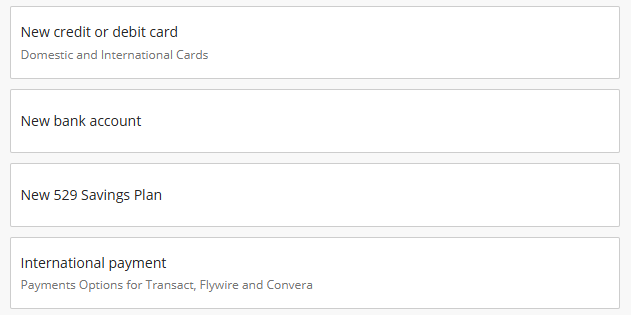
Dates to request funds from your provider are as follows:
Students should inform the state provider sending the funds to the SAIC Bursar's Office that the student name and ID number should appear on all correspondence and transactions.
Invoicing
If the agency that holds your 529 benefits requires invoices, please contact Student Financial Services immediately with the contact information of the agency, and the name of the student by email at saic.sfs@saic.edu. In some cases, SAIC may be required to complete a form or letter of credit that is provided by the 529 Plan provider.
-
Once you receive an outside scholarship grant or award, you must follow these steps to ensure a smooth processing experience:
Inform the Student Financial Services Office about the scholarship award by submitting a copy of the award letter.
The notification to SAIC should include:- name of the organization sending the funds,
- name and telephone number of the contact person at the organization
- dollar amount the student will receive
Inform the organization sending the funds to SAIC that your name and student ID number should appear on all correspondence related to the scholarship, grant, or award.
To avoid a delay in processing, please send information and/or payments to the Student Financial Services Office and NOT to the Bursar's Office.
Payments and correspondence should be sent to:
School of the Art Institute of Chicago
Student Financial Services
36 S. Wabash Ave., Suite 1200
Chicago, IL 60603Some scholarships may require additional forms or documentation. Ensure you submit these promptly. The Student Financial Services Office will apply the scholarship to your student account, which may affect your financial aid package.
-
SAIC issues electronic bills at the end of each month for students with a balance or account activity.
Accessing eBills:
- Log into Self-Service.
- Click on Financial Account.
- Open Transact and click on "Statements."
Payment Plans
Electronic bills are available to students and payers in Transact. Payers are set up by the student in Transact, and an email notification is sent each month to students and payers when a new bill is available.
-
- Summer: Three payments due no later than the 15th day of each month
- Fall & Spring: Four payments due no later than the 15th day of each month
- Winter: We do not offer payment plans for the winter session. Payment is due in full on December 15.
-
Our priority deadline is by the 1st of the month, before the first payment is due. A nonrefundable fee of $50 applies.
How to Enroll in a Payment Plan:
- Log into Self-Service or Transact.
- Click on Financial Account and then Transact.
- Select "Payment Plans" from the menu.
- Review options and complete enrollment.
-
Autopay is an optional complement to conveniently manage your Transact payment plan. To enroll in autopay, please do one of the following:
- Once enrolled in a payment plan, you may choose to sign up for autopay at the end of your payment plan signup.
- Click on "Set Up Autopay" under the Overview or Payment Plans tab to enroll in or manage autopay at any time for your payment plan.
Need Assistance? We’re Here to Help
If you have any questions or want personalized guidance, please contact Student Financial Services.
- Phone: 312.629.6600
- Email: saic.sfs@saic.edu
- Make a Virtual or Phone Appointment: Prospective students, parents, and alumni can schedule via Acuity and current students can schedule via Navigate.
